1,900+ WhatsApp groups. One calm workspace.
Community Center Manager lets the team run a large broker network on WhatsApp across multiple numbers. They can create and replicate groups, manage admins and members, and broadcast to hundreds of groups through a queue that keeps working after you close the laptop.
The problem
WhatsApp was the main channel to a large broker community, but WhatsApp isn't built to be operated at that scale by a team.
No official tool existed
Meta doesn't offer bulk group management, and neither do its partners. Meta's Groups API is only in beta, with a cap on members per group. There was nothing to buy, so I built it.
Hours of copy and paste
Posting one update to every group took about three hours of someone's day, one group at a time.
Risk of being blocked
Sending too fast, or retrying carelessly, can get a business number restricted. That would cut off the whole network.
Admin work that doesn't scale
Creating groups, copying members, changing admins and removing people were all manual and error-prone across hundreds of groups.
The system
The key idea: the browser is only the control panel. Once a broadcast is submitted, it becomes a durable job on the server and finishes whether or not anyone is watching.
Inside the app
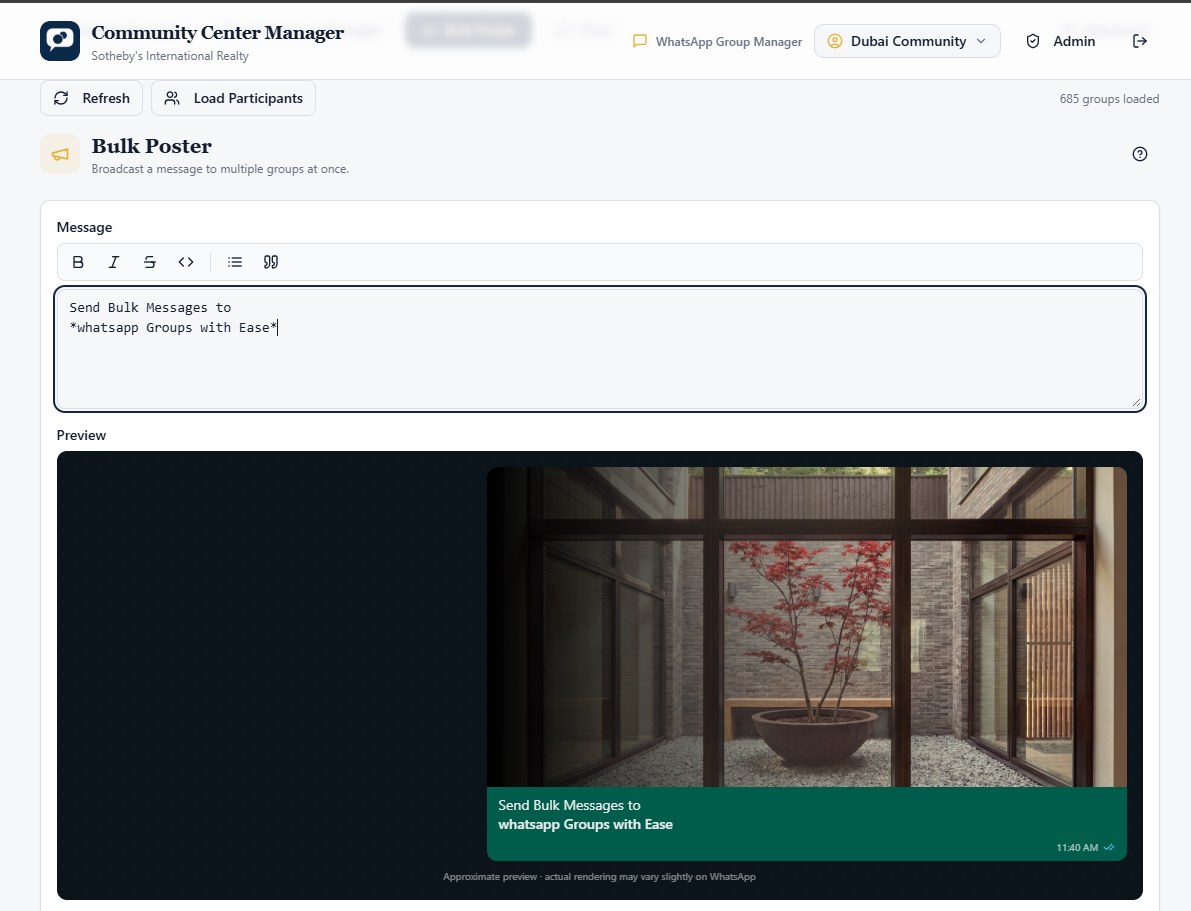
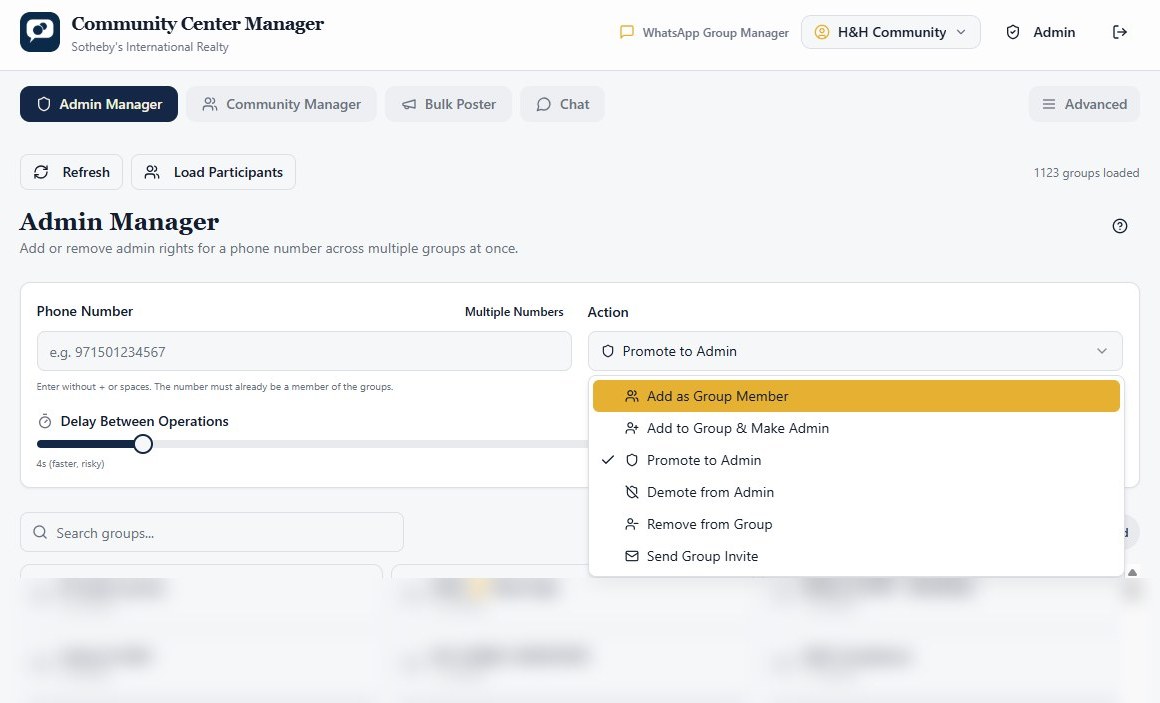
The real interface. Group names are blurred for privacy.
Nine tools, one workspace
Everything the community team does in a day, behind one login and one set of permissions.
Groups dashboard
Load, search, select and export groups and participants to Excel.
Group replicator
Clone groups with new names, descriptions, icons, exclusions and pacing.
Admin manager
Bulk membership and admin changes, with a fast controlled removal mode.
Community manager
Create WhatsApp Communities and link groups within capacity limits.
Bulk poster
Queue text or media to thousands of groups with live progress.
Saved segments
Reusable named sets of groups, shared per channel.
Chat
Two-panel inbox to read conversations and reply.
Manual group builder
Guided, step-by-step group creation for sensitive cases.
Admin & access
Users, roles and a matrix of who can use which channel.
Designed for things going wrong
Third-party messaging APIs fail in messy ways. Every failure mode has a defined response.
The job is already in the database. It keeps sending.
Atomic claiming with row locks. The same message is never picked up twice.
Requeued with exponential backoff, respecting the provider's Retry-After.
Marked "sent-unconfirmed" and not resent. A duplicate is worse than a gap.
After a stale-lock timeout, the row becomes safe to retry.
The screen reconciles on a timer and whenever the tab becomes visible again.
Decisions that matter
Small choices that separate a useful tool from a risky one.
Server-side jobs, not browser loops
Bulk work lives in a queue on the backend, so a dropped connection never leaves a broadcast half done.
Upload once, send many
A video is uploaded a single time and its media ID is reused for every group. That's faster, cheaper and far less likely to time out.
Protect the account first
A fixed per-channel quota, with heavy media sent one at a time, keeps sending well within what WhatsApp tolerates.
Channels run independently
New WhatsApp numbers can be added as the network grows. Each one has its own groups, queue and rate limit. Switching channel clears every selection, and users only see the channels they've been assigned.
Credentials never touch the browser
Channel tokens are resolved on the server at runtime and are never stored on the user's device.
"Not in group" counts as done
When removing someone who already left, the tool treats it as success, not an error. The outcome is what matters.
Where else this works
Any organisation that runs a large network through messaging channels and needs it controlled, auditable and safe.
- Dealer & partner networks
- Franchise communications
- Customer communities
- Field sales teams
- Event & alumni groups
- Support broadcasts